KVM Switch: How to Choose the Right Type for Your Setup
By Jan Hoffmeier · 27 August 2026
Buying a KVM switch looks like counting ports.
It is not.
Two units with the same port count can behave very differently. The decisions that matter sit in the video path, the USB handling and the distance.
Get those three right and the KVM switch disappears into the desk. Get them wrong and you notice it every time you switch.
What a KVM Switch Actually Does
One Console, Several Machines
KVM stands for keyboard, video and mouse. A KVM switch lets one console drive several computers, so the desk carries one set of peripherals instead of four.
Black Box lists desktop units serving two, four, eight or sixteen computers from a single user console. Beyond that, the switch stops being a desk accessory and becomes rack infrastructure. The jump changes how you buy it.
- Video is carried from each computer to the shared monitor.
- Keyboard and mouse are presented to whichever computer is selected.
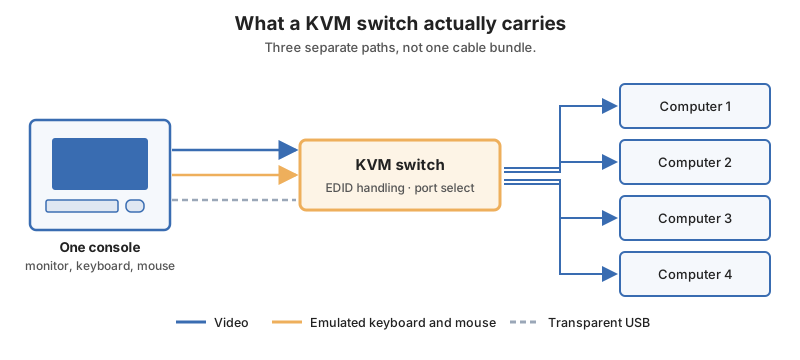
- Other USB devices may or may not follow the selection. - This is the split most buyers miss.
- Audio and serial ride along on many models.
Why It Is Not Just a Cable Splitter
A monitor negotiates its capabilities with a computer before it draws anything. A KVM switch sits in the middle of that conversation, which is why the good ones carry EDID handling.
Black Box's advanced EDID features exist so monitors are recognised at optimum resolution, rather than dropping to a safe fallback when the switch changes port.
The Five Types of KVM Switch
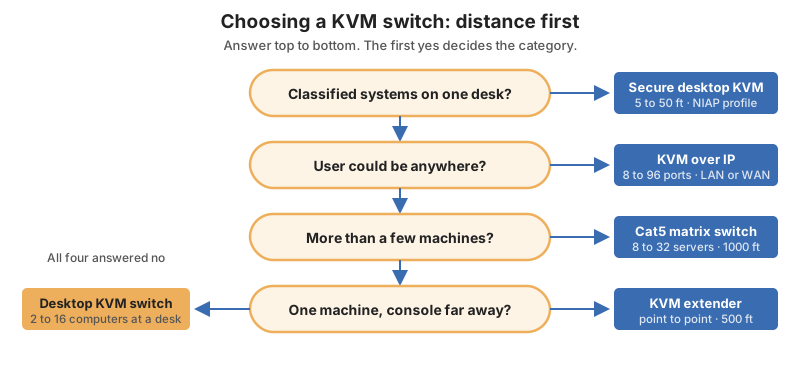
Raritan's selection guide sorts the market by reach and scale rather than by brand. That is the useful way to read it.
| Type | Reach | Scale | Typical use |
|---|---|---|---|
| KVM extension | Up to 500 feet | One computer, point to point | Console away from a noisy room |
| Desktop switch | At the desk | A few computers nearby | Multi-machine workstation |
| Cat5 matrix switch | Up to 1000 feet | 8, 16 or 32 servers, 1 to 2 users | Lab or small server room |
| KVM over IP | Unlimited, over LAN or WAN | 8 to 96 ports, up to 8 sessions | Data centre remote access |
| Centralised management | Multi-site | Thousands of servers | Enterprise estate |
Extension Versus Switching
Extension moves one console away from one computer. Switching shares one console across many. Plenty of projects need both, and the two functions are sold separately.
Raritan notes that an extender can be daisy-chained through Ethernet switches when 500 feet is not enough.
Where the Matrix Fits
A Cat5 matrix KVM switch is the middle ground. It reaches a thousand feet, handles up to thirty-two servers, and tiers or stacks when the count grows.
- Tiering hangs more switches beneath a primary unit.
- Stacking widens the port count at one level. - Both keep a single console at the front.
- Cat5 cabling is usually already in the room.
When IP Wins
Once the user might be anywhere, a KVM switch over IP is the only honest answer. Raritan's range runs from one session on eight ports up to eight sessions on sixty-four ports.
- Remote hands stop being a site visit.
- Out-of-band access survives an operating system that will not boot.
- Session count matters as much as port count.
- Centralised management layers on top for multi-site estates.
Video Is the First Hard Limit
The Interface Sets the Ceiling
No KVM switch exceeds the interface it is built around. Black Box publishes the ceilings plainly, and they are worth checking before anything else.
| Video interface | Maximum resolution |
|---|---|
| VGA | 1920×1440 typical |
| DVI-D single link | 1920×1200 |
| DVI-D dual link | 2560×1600 or 2048×2048 |
| DisplayPort 1.1 | 2560×1600 |
| DisplayPort 1.2 or HDMI 2.0 | 3840×2160 at 60 Hz |
- Match the weakest link, which is often the cable, not the switch.
- Check refresh rate, not just the pixel count.
- Confirm chroma subsampling where text sharpness matters. - Some models reach 4K at 60 Hz with full 4:4:4 colour. - Others reach the same resolution at 30 Hz only.
- Count the heads your workflow actually uses.
Multi-Monitor and Multiviewer
Black Box lists single, dual, triple and quad monitor models. A multiviewer is different again, putting up to four sources on one screen at once.
Choose between them by task. Switching suits deep work on one machine, and a multiviewer suits watching several. Many desks end up with both.
USB Handling Decides How It Feels
Emulated Versus Transparent Ports
This is the specification that separates a KVM switch that feels instant from one that feels sluggish. Black Box lists the two kinds of port separately on every model.
- Emulated USB HID ports keep a keyboard and mouse permanently presented to every computer. - Nothing re-enumerates when you switch. - The machine you left never loses its input devices.
- Transparent USB ports pass a real device through to the selected computer only. - Use these for storage, cameras and graphics tablets. - Expect a re-enumeration delay on each switch.
Match the Port to the Device
Put the keyboard and mouse on emulated ports and everything else on transparent ones. That single habit removes most complaints about switching lag. It costs nothing at purchase time.
Black Box also notes that trusted KVM technology switches between problem computers without frequent rebooting, which is exactly what emulation buys you.
Peripherals Beyond Keyboard and Mouse
Graphics tablets, audio interfaces and licence dongles all behave differently through a KVM switch. Check them individually rather than assuming.
Sizing Ports, Users and Distance
Raritan reduces the whole decision to four questions, and they are the right four.
- How many users and computers are involved.
- What distance separates them.
- What cabling or network already runs between them.
- What special need applies, such as 4K, high performance or classified work.
Leave Room to Grow
Buy the port count you will need next year. A four-port unit replaced in six months costs more than an eight-port one bought once. Ports are the cheapest part of the decision.
Racks, Trays and Cable Runs
A rack-mounted KVM switch needs somewhere to live and a way to reach the servers. Our range of server racks sets the U height available, and rack accessories cover the shelves, blanking panels and management arms around it.
- Measure the free U height before picking a form factor.
- Leave a spare U above the KVM switch for airflow.
- Check body depth, since deep units foul the rear rails.
Cabling deserves the same planning. Overhead cable runways keep KVM, network and power runs separated instead of tangled behind the cabinet.
Secure KVM Switches and Classified Work
Isolation Is the Whole Point
A secure KVM switch is a different product, not a hardened version of the normal one. It exists so an operator can work across classification levels from one desk without any path between them.
Raritan places these at 5 to 50 foot distances, for government, military and intelligence use.
The Certification to Ask For
NIAP publishes a Common Criteria Protection Profile for Peripheral Sharing Devices, and its current version is the one to specify.
- Ask for lab-tested certification, not a claim of compliance.
- Check the profile version on the NIAP listing itself.
- Expect physical defences such as tamper-evident seals alongside the logical ones.
- Expect no shared memory between connected systems.
Frequently Asked Questions
What does KVM stand for?
Keyboard, video and mouse, shared by one KVM switch across several computers.
How many computers can one KVM switch handle?
Desktop units typically serve two, four, eight or sixteen. Matrix switches reach thirty-two servers, and KVM over IP models run from eight up to ninety-six ports.
Why does my mouse lag when I switch?
Usually the keyboard and mouse are on transparent USB ports rather than emulated ones. Emulated ports keep the devices presented to every computer, so nothing re-enumerates. Move them and the lag goes.
Can a KVM switch run 4K at 60 Hz?
Yes, on the right interface. Black Box lists 3840×2160 at 60 Hz on the newer DisplayPort and HDMI models in the table above, while earlier DisplayPort and single link DVI-D stop well short.
Do I need a secure KVM switch?
Only if you work across security classifications. If you do, specify a unit lab tested against the current NIAP protection profile for peripheral sharing devices.
Conclusion
A KVM switch is bought on port count and lived with on everything else.
Start with distance, because it decides the whole product category. Then set the video ceiling from the interface, put the keyboard and mouse on emulated ports, and only then count how many machines need connecting.
Do it in that order and the KVM switch you buy will still be the right one when the rack fills up.
Related Posts
What Bathroom Partitions Have to Survive

Pipe Fittings Explained: Types, Materials and How to Choose

Box Stapler Guide: Types, Staple Sizes and How to Choose One